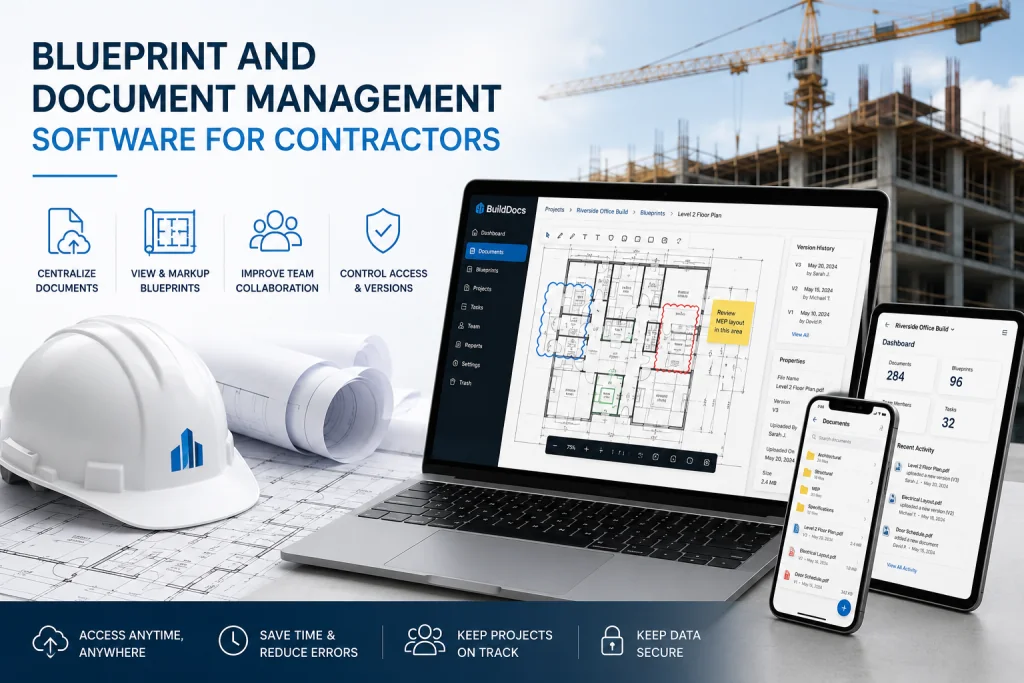
Blueprint and Document Management Software for Contractors?
Blueprint and Document Management Software for Contractors?
Picture this: It’s 7:00 AM on a Tuesday. The field crew is ready to start framing, but the site superintendent is stuck in the job trailer digging through a messy stack of rolled-up drawings, trying to find the latest revised architectural plans. Meanwhile, the plumbing sub is asking for the latest RFI responses, and the project manager is buried in an email chain trying to locate a specific submittal.
Sound familiar?
In the construction industry, information is just as critical as the materials you use. Relying on outdated blueprints or losing critical project documents doesn’t just cause frustration—it leads to costly rework, schedule delays, and strained relationships.
If you are asking, "What is the best blueprint and document management software for contractors?" you are already taking the first step toward modernizing your operations. The ultimate goal? To find tools that seamlessly organize and share job documents between the office, the field, and your subcontractors.
Here is a comprehensive guide to choosing the right blueprint and document management software to keep your construction projects on track and on budget.
Why Contractors Need Dedicated Document Management
Construction projects generate a massive volume of documentation: blueprints, RFIs, submittals, change orders, daily logs, and safety reports. When these documents are siloed in email inboxes, local hard drives, or physical binders, you create a single point of failure.
Dedicated blueprint and document management software solves this by providing a Single Source of Truth (SSOT).
- Version Control: Ensures field crews are always building from the most recently issued drawings, eliminating costly rework.
- Real-Time Collaboration: Allows architects, engineers, general contractors, and subcontractors to view, markup, and comment on documents simultaneously.
- Accessibility: Gives field teams mobile access to plans and documents directly from their tablets or smartphones, right at the point of installation.
Key Features to Look For: How to Find the Right Tools
When evaluating software to organize and share job documents, don't just look for basic file storage. You need construction-specific functionality. Look for these core features:
- Offline Mobile Access: Internet connectivity on a job site is never guaranteed. The software must allow users to download plans and documents for offline viewing, syncing automatically once reconnected.
- Advanced Blueprint Markups: Tools should allow field crews to easily drop pins, take photos, measure areas, and annotate directly onto the digital blueprints.
- Automated Version Control: The system should automatically archive old drawing revisions and notify relevant team members when a new set is issued.
- Granular Permissions: You need to control who can view, edit, or download sensitive documents, ensuring subcontractors only see what they need to see.
- Ecosystem Integration: The document management tool should integrate seamlessly with your existing estimating, accounting, and project management software.
Top Blueprint and Document Management Tools for Contractors
The market is saturated with construction tech, but a few platforms have proven themselves as industry leaders for organizing and sharing job documents.
1. Autodesk Build (formerly PlanGrid)
Best for: Field-centric blueprint management and issue tracking. Autodesk Build is a powerhouse for getting the latest drawings into the hands of field crews. It excels at blueprint version control, allowing superintendents to instantly push updated plans to all field tablets. Its robust issue-tracking and photo documentation features make it easy to organize punch lists and share visual updates with the office.
2. Procore
Best for: Comprehensive, enterprise-level project and document management. If you are looking for an all-in-one platform, Procore is the industry standard. Its Document Management tool is highly customizable, allowing you to organize files by CSI MasterFormat, folder structures, or custom tags. It seamlessly connects your blueprints with RFIs, Submittals, and Change Orders, ensuring every document is contextualized and easily shared with stakeholders.
3. Bluebeam Revu
Best for: Preconstruction, estimating, and heavy PDF markup. While often used in the office, Bluebeam is the gold standard for PDF markup. Contractors use it to quantify takeoffs, overlay drawing revisions to spot changes, and create highly detailed, organized document sets. It’s an essential tool for organizing complex job documents before they ever hit the field.
4. Fieldwire
Best for: Small to mid-sized contractors and task management. Fieldwire is a highly intuitive, mobile-first platform that combines plan viewing with task management. It’s incredibly easy for subcontractors to adopt. You can view blueprints, assign tasks directly from the plans, and share documents effortlessly, making it a fantastic tool for organizing daily job site workflows.
5. PlanRadar
Best for: Defect management and handover documentation. PlanRadar excels at documenting the physical reality of the build against the digital blueprints. It is particularly strong in organizing snag/punch lists, defect tracking, and creating digital handover documents at the end of the project, ensuring all job documents are perfectly organized for the owner.
Best Practices for Implementing Document Management
Buying the software is only half the battle; getting your team to use it is the other. To successfully organize and share job documents, follow these best practices:
- Standardize Naming Conventions: Before uploading a single file, establish a strict naming convention for all documents (e.g.,
ProjectNumber_Discipline_DrawingNumber_Revision). - Train the Field, Not Just the Office: The software is useless if the superintendents and foremen don't know how to use it. Invest time in hands-on, tablet-based training for your field crews.
- Establish a "No Paper" Rule: To force adoption, stop printing physical blueprints for the field. If the plans are only available on the tablets, the team will quickly learn to rely on the software.
- Appoint a Document Controller: For larger projects, designate a specific person responsible for uploading, organizing, and distributing the latest documents to prevent bottlenecks.
The days of managing multi-million-dollar construction projects with rolled-up blueprints and scattered email attachments are over. By investing in the right blueprint and document management software, you empower your team to organize and share job documents with unprecedented efficiency.
When your field crews have instant access to the right information, and your office has total visibility into project documentation, you reduce risk, eliminate rework, and protect your profit margins.
Found this article valuable?
Share it with fellow builders, architects, or download the QR code.
Written by Shanmugam2026
Verified CreatorARQONZ Editorial Team brings you expert insights, construction guides, and architectural design trends from across the building industry.
Related Articles in Construction

What Should I Never Say to My Contractor?